· A file name in Windows is made up of two parts a name and an extension. These two parts are separated by a period.
· By default, the extension is hidden in Windows. So a file named vacation.jpg might appear to be simply vacation . You could even have several files named "vacation", each with a different extension (potentially confusing).
· We rarely need to type out the entire file name because we often select a file by clicking on it with a cursor. However, if we do need to refer to the entire name for some reason, we have to be able to find the whole thing, both name and extention. For instance, you don't want to confuse the picture vacation.jpg with the text vacation.doc or the video vacation.mp4, or the audio vacation.mp3. You also don't want to think you are clicking on an image which is really a disguised virus!
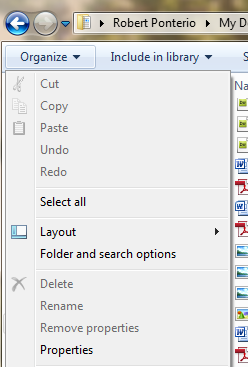
When looking at My Documents, the Folder and Search Options can be found under the Organize menu. (Different versions of Windows might handle this in slightly different ways.)
 |
|
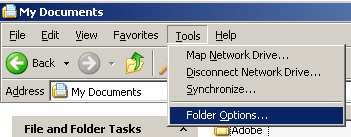
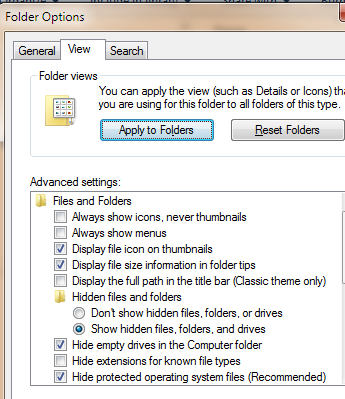
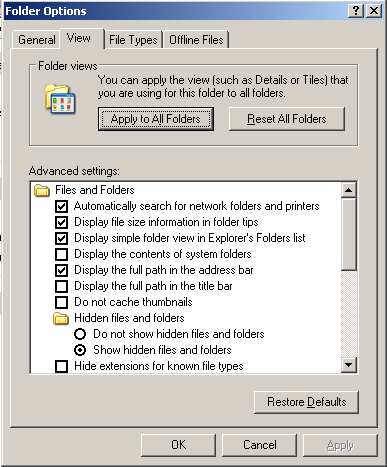
The Folder Option that allows us to hide or see the file extension is on the View tab: Hide extensions for known file types. Unchecking this option and applying the change to all folders will make those file extensions visible. (This is similar in Windows 7, 8, 10 & XP.) Doing this can help you avoid making many mistakes.
 |
 |
When putting files in web pages or linking to a file, the entire file name, including the extension, is necessary.